Introducrion
The NVIDIA DGX A100 is six years old, but eight A100 GPUs still give research teams plenty of computing power. The 640GB version can handle demanding training and scientific workloads, provided the software supports the hardware and the purchase price makes sense.
NVIDIA launched the original system in May 2020 with eight 40GB GPUs. The 80GB version followed later that year, doubling total GPU memory. Buyers today have a different decision to make: how much useful work can this older system deliver for the cost of buying, powering, and maintaining it?
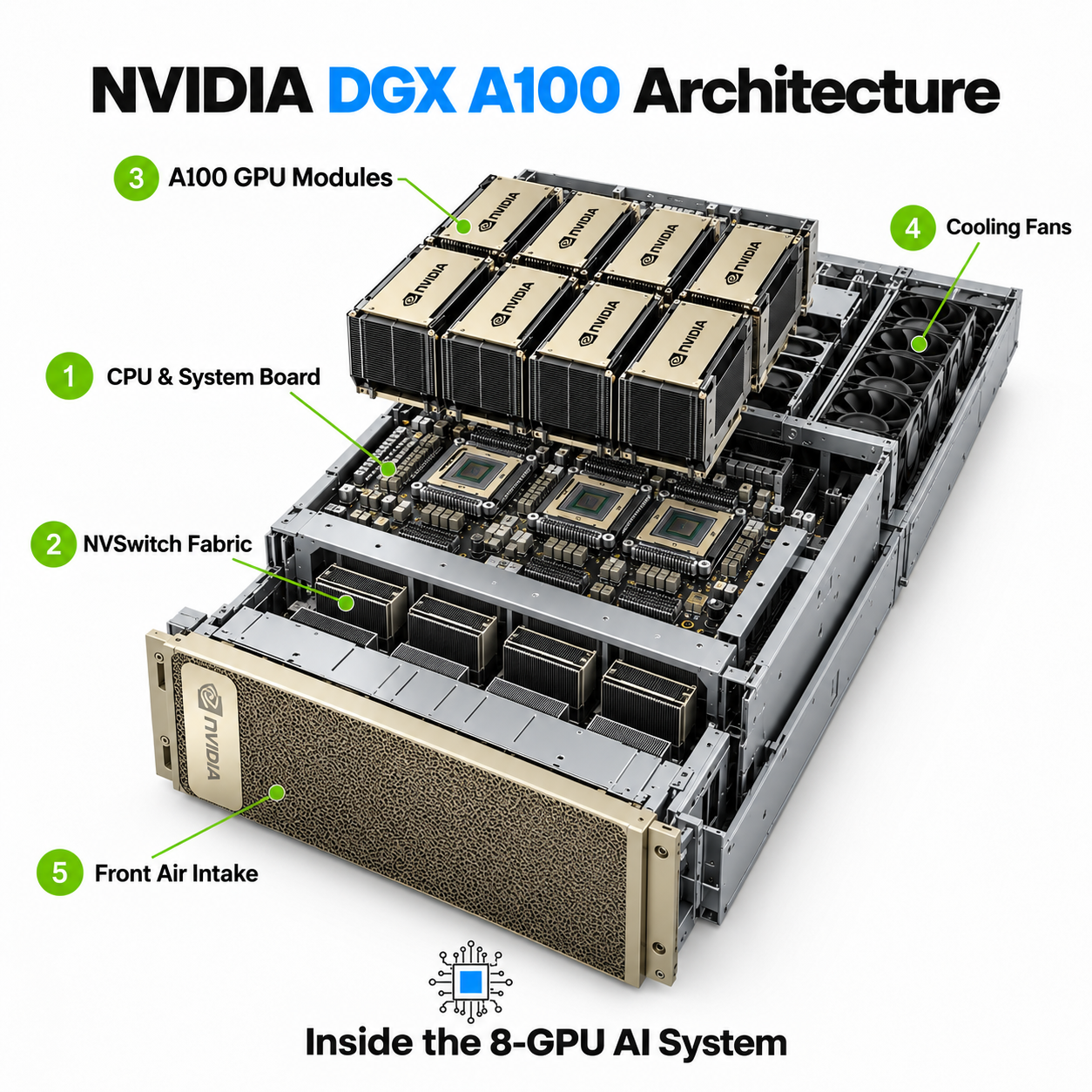
NVIDIA DGX A100 Architecture: What's Inside the 8-GPU AI Server?
NVIDIA designed the DGX A100 as a complete system, with the GPUs, networking, cooling, and software built to work together. That saves teams some of the integration work involved in assembling a server themselves.
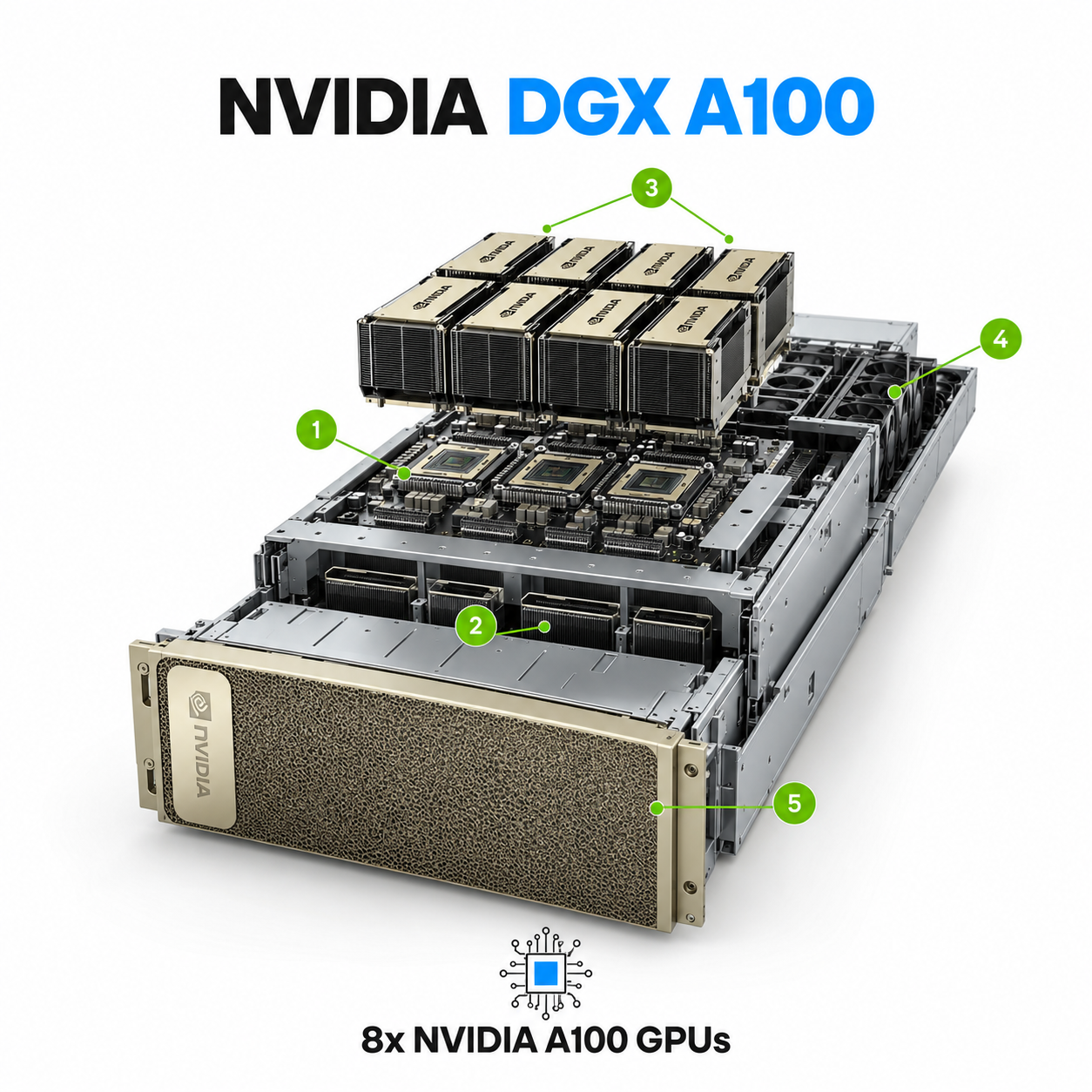
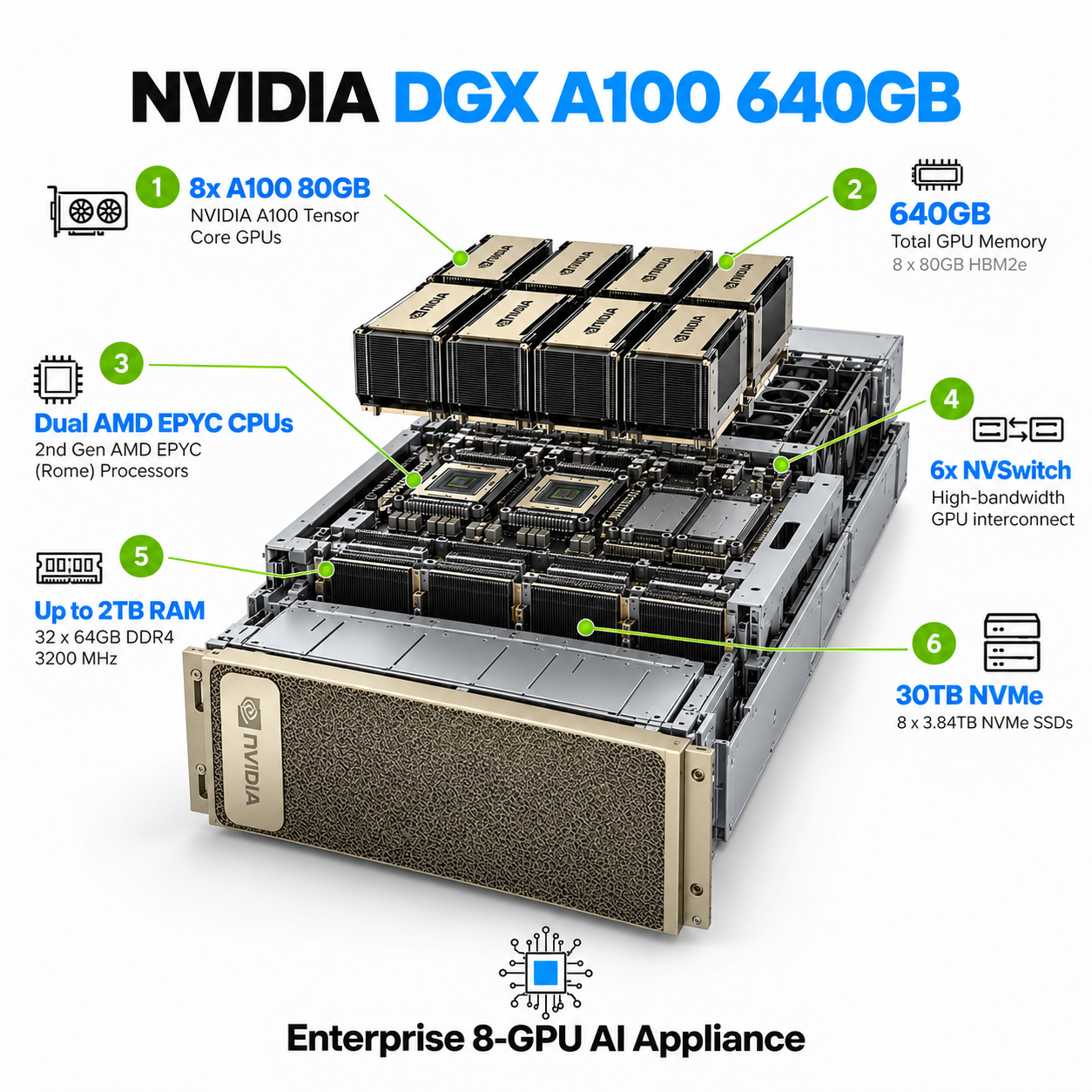
The 6U chassis holds eight A100 Tensor Core GPUs, six NVSwitches, two AMD EPYC processors, DDR4 system memory, NVMe storage, and fast network connections for linking additional servers.
The 640GB model has 80GB on each GPU. Those memory banks remain separate: software must divide a large workload across the GPUs to use their combined capacity. A model cannot simply request one ordinary 640GB GPU allocation.
NVIDIA DGX A100 640GB Full Specs: GPUs, Memory, CPUs and Storage
| Component | Specification |
|---|---|
| Manufacturer | NVIDIA |
| Model | DGX A100 640GB |
| Launch generation | 2020 |
| GPU architecture | NVIDIA Ampere |
| GPUs | 8 × NVIDIA A100 80GB SXM4 |
| Total GPU memory | 640GB HBM2e |
| Memory per GPU | 80GB |
| GPU interconnect | Third-generation NVLink |
| NVLinks per GPU | 12 |
| NVLink bandwidth | 600 GB/s bidirectional per GPU |
| NVSwitches | 6 |
| Aggregate NVLink bandwidth | 4.8 TB/s bidirectional |
| Advertised AI performance | Up to 5 petaFLOPS |
| Multi-Instance GPU | Up to 56 GPU instances |
| Processors | 2 × AMD EPYC 7742 |
| CPU cores | 128 total |
| System RAM | 2TB in the 640GB factory configuration |
| Internal data storage | 30TB NVMe in the 640GB factory configuration |
| Networking | Up to 10 high-speed network adapters, depending on configuration |
| Operating environment | DGX OS, based on Ubuntu Linux |
| Chassis | 6U rackmount |
| Maximum system power | 6.5kW |
The quoted 5 petaFLOPS is a peak AI performance figure under specific numerical precision and acceleration conditions. It should not be interpreted as the performance delivered by every application.
NVIDIA DGX A100 AI Benchmarks: BERT Training and A100 vs V100 Performance
NVIDIA’s launch benchmarks reported 1,289 sequences per second for BERT-Large training on the DGX A100, compared with 216 on an eight-V100 system—about six times the throughput.
The settings matter. The A100 test used TF32, while the V100 test used FP32. The result shows the combined benefit of the newer hardware and its supported numerical formats; it is not a comparison at identical precision.
NVIDIA also published ResNet-50 training results for the eight-GPU A100 80GB configuration. The system processed 7,248 images per second using TF32 and 16,621 images per second with mixed precision, showing how the choice of numerical precision can affect training throughput.
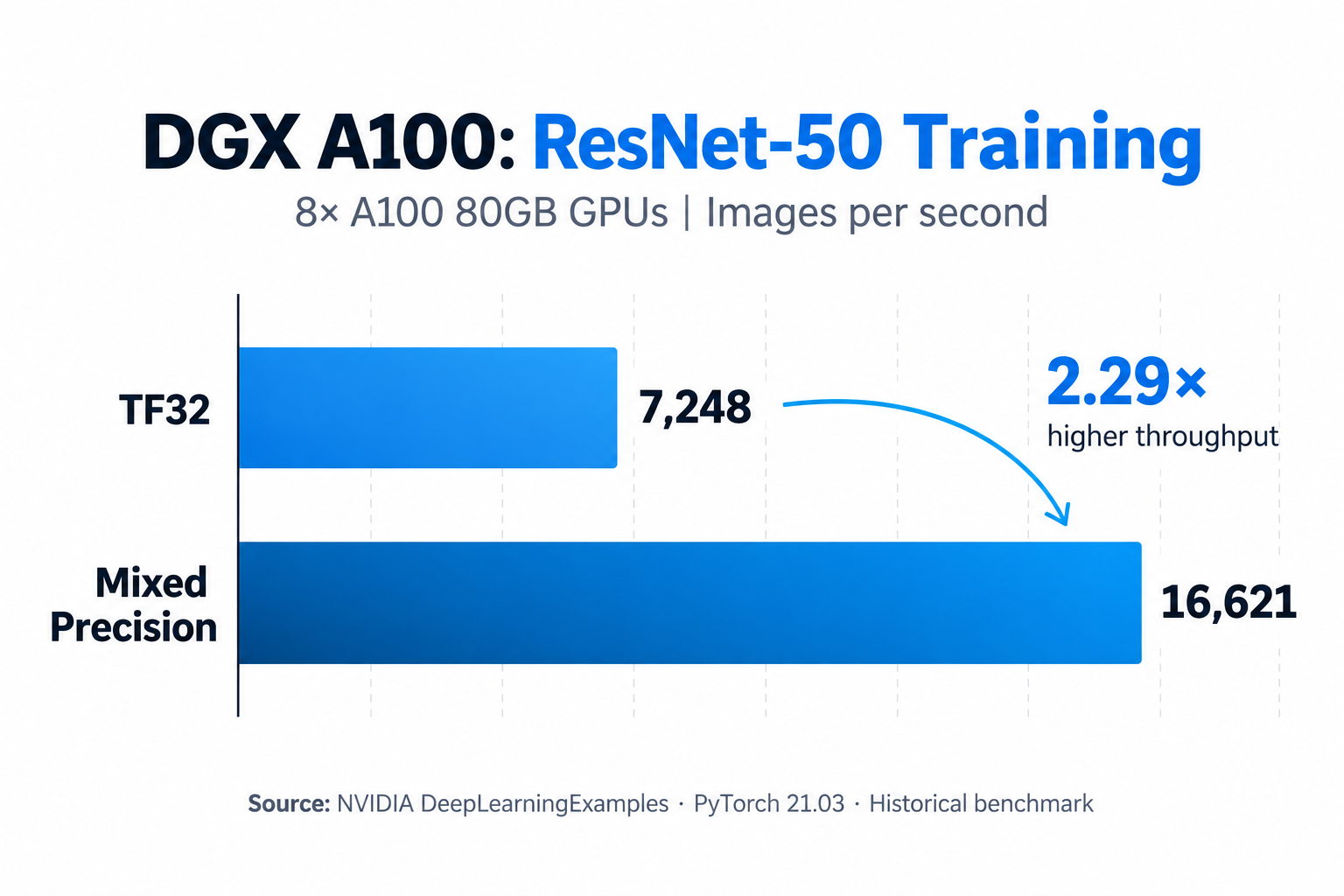
A100 Tensor Cores also support double-precision operations, giving the system a role in scientific computing as well as neural network training. For a purchase today, though, an old benchmark only tells part of the story. Test the model, batch size, precision, and software version your team will actually use.
DGX A100 for Federated Learning: Real-World Research Performance
In an account involving AI Sweden and infrastructure maintained by Ciget, researchers described using a DGX A100 for federated learning experiments. This approach lets participants train locally and share model updates while keeping raw datasets at their original locations.
Keeping data local can reduce transfers, but privacy still needs attention. Model updates can reveal sensitive information unless the system includes suitable protections.
The researchers reported roughly six to eight times the performance of an older NVIDIA K80 GPU for their application, even without mixed-precision optimisation. The added capacity helped them finish experiments before a conference deadline. That is a useful example of the machine’s role in research, although the result should not be applied to unrelated workloads or configurations.
Running NVIDIA NeMo on DGX A100 for Speech and Language AI
A speech assistant often uses several models: one recognises speech, another handles language, and another produces audio. NVIDIA NeMo provides tools to develop, train, and adapt these components, including training across multiple GPUs and mixed precision where supported.
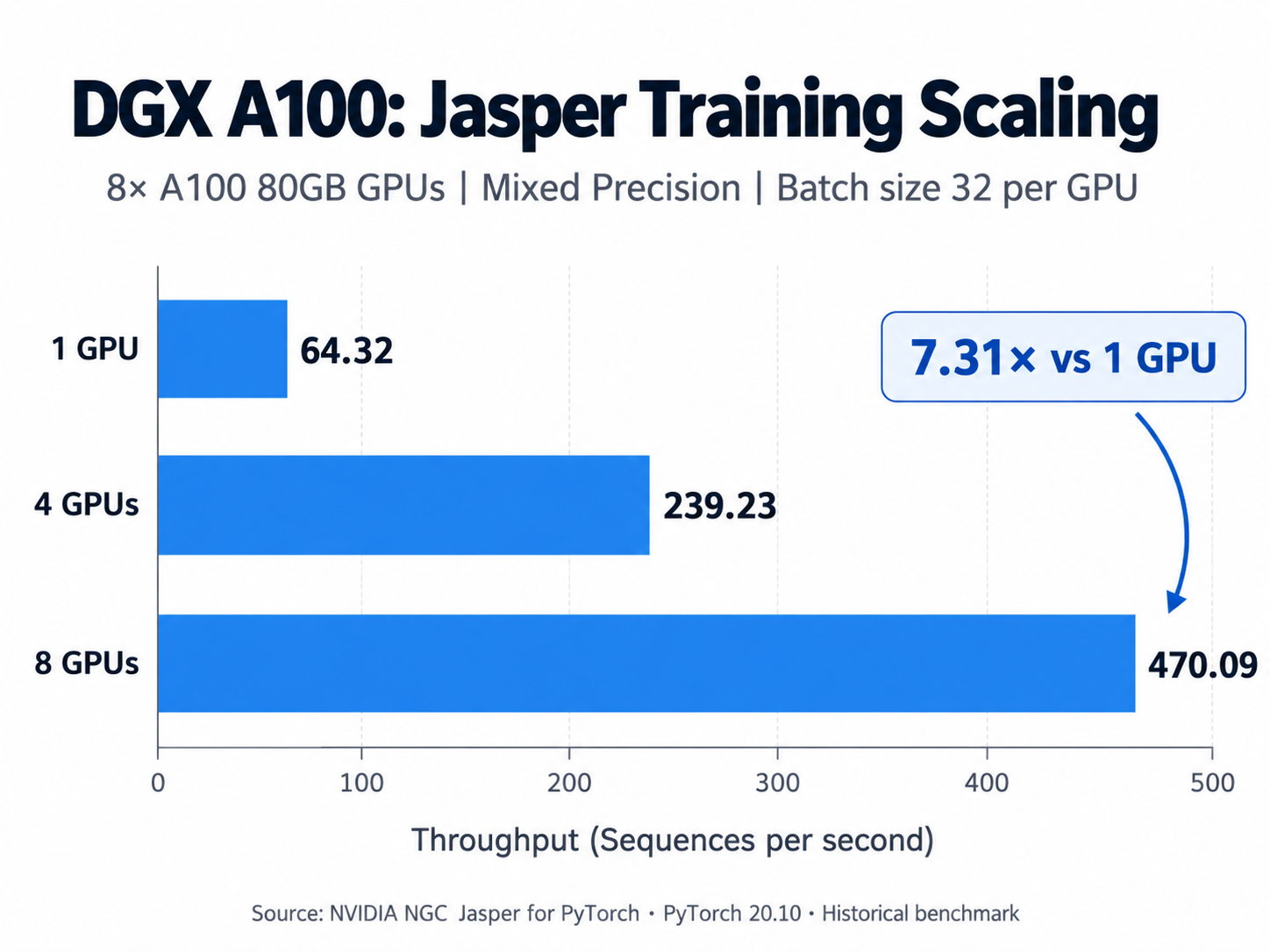
Earlier NVIDIA demonstrations used Tacotron 2 to turn text into a Mel spectrogram and WaveGlow to convert that representation into an audio waveform. These are older architectures, but they illustrate how separate models form a text-to-speech pipeline.
DGX A100 can also run other compatible speech and language models, including BERT-based applications. Teams should check the requirements of their chosen models and NeMo release. NeMo is available through NVIDIA’s software channels and official GitHub repository.
DGX A100 NVLink and NVSwitch: How Eight A100 GPUs Work Together
Large training jobs move data between GPUs throughout a run. If those transfers are slow, the processors spend time waiting.
The DGX A100 uses six second-generation NVSwitches to connect its GPUs. Each A100 has 12 third-generation NVLink connections, providing up to 600 GB/s of bidirectional bandwidth per GPU. The aggregate figure across all eight is 4.8 TB/s.
This connection matters when different parts of a model run on separate GPUs. It is also part of what buyers pay for: the system’s value includes its communication fabric, cooling, power delivery, and software integration, as well as the eight accelerators.
NVIDIA DGX A100 MIG: How to Split 8 GPUs into 56 Instances
Multi-Instance GPU, or MIG, lets administrators divide each A100 into as many as seven isolated instances. Across eight GPUs, that gives a maximum of 56 instances, depending on the chosen configuration.
A university could assign smaller instances to inference experiments or modest training jobs, then allocate whole GPUs to larger projects. Each instance receives only part of its parent GPU’s memory and computing resources, so 56 instances do not provide the performance of 56 A100s.
NVIDIA DGX A100 Power Consumption: 6.5kW and Electricity Costs
NVIDIA specifies a maximum system power draw of 6.5kW. The server has six power supplies arranged with redundancy. Running continuously at the maximum would use:
| Operating period | Energy consumption |
|---|---|
| 1 hour | 6.5 kWh |
| 24 hours | 156 kWh |
| 30 days | 4,680 kWh |
| 365 days | 56,940 kWh |
At $0.10 per kWh, that would cost $468 over 30 days for the server alone. Facility cooling and other infrastructure would add to the bill.
Actual power use changes with GPU utilisation, CPU activity, and the workload. Treat 6.5kW as the specified maximum for planning, rather than a measured constant. Rack space, electrical capacity, airflow, and cooling should all be checked before ordering.
NVIDIA DGX A100 Price in 2026: New, Used and Refurbished Systems
The original DGX A100 launched at a starting price of about $199,000. Used and refurbished machines now give buyers other options.
The source listing cited here advertises a tested DGX A100 640GB from German reseller Miller Anlagen for €110,000 excluding VAT. This is one seller’s asking price, not a market average or evidence of a completed sale. Confirm the current quote and availability directly with the seller.
GPU condition, installed RAM and storage, network adapters, warranty, and delivery terms can all change the total price. For new old stock, check the unit’s manufacturing history, sealed condition, and eligibility for NVIDIA support.
NVIDIA DGX A100 vs H100 and Blackwell: Performance and Upgrade Considerations
Hopper and Blackwell systems offer newer memory, more compute capacity, and support for numerical formats that can benefit modern AI applications. The A100 uses HBM2e and third-generation Tensor Cores, so its age can show in demanding transformer workloads.
Established CUDA applications, research experiments, and smaller distributed training jobs may still run well enough on DGX A100. Teams working on very large models or busy inference services should compare throughput, latency, and energy use against newer options.
The useful measure is the total cost of completing the work. A lower purchase price can lose its appeal if jobs take much longer or require more electricity and maintenance.
DGX A100 vs Custom 8-GPU Server: Integration, Software and Support
An experienced infrastructure team may prefer a custom server. DGX A100 offers hardware that NVIDIA designed and validated together, plus a software environment built for supported AI frameworks. That can save time during deployment and troubleshooting.
For an older unit, confirm which software releases it supports and what service coverage is available. The NVIDIA badge alone does not mean the machine still has an active manufacturer support contract.
Buying a Used NVIDIA DGX A100: Shipping, Testing and Warranty Check
MillionMiner’s listing describes the DGX A100 as a factory-integrated system and advertises worldwide Delivered Duty Paid shipping to more than 50 countries. It also describes hardware testing, deployment help, and warranty-case handling.
These are the seller’s stated terms. Get written confirmation for the specific unit, including duties and taxes, stock condition, lead time, testing records, and manufacturer warranty eligibility. A pre-shipment test report and clear service agreement are particularly useful for a purchase of this size.
Is the NVIDIA DGX A100 640GB Still Worth Buying in 2026?
A DGX A100 can still be useful to a university, lab, or business with established AI workloads. Its eight GPUs, combined memory capacity, and fast internal connections give it plenty of work it can do well.
The purchase makes sense when the machine can run the required software, finish jobs on schedule, and cost less overall than the alternatives. Include electricity, cooling, repairs, and support in that comparison. A discounted system is a good deal only if it suits the work you need it to do.
Frequently Asked Questions
When was the NVIDIA DGX A100 released?
NVIDIA announced the original DGX A100 on May 14, 2020. The 640GB configuration followed the announcement of the A100 80GB GPU on November 16, 2020.
How much GPU memory does the DGX A100 have?
The 640GB model has eight A100 GPUs with 80GB each. The original model provided 320GB using eight 40GB GPUs.
Is 640GB of GPU memory shared?
The GPUs are connected by NVLink and NVSwitch, but their memory remains physically distributed. Applications must use compatible multi-GPU techniques to work across the available memory.
How much electricity does a DGX A100 consume?
NVIDIA specifies a maximum system power draw of 6.5kW. Running at that level continuously would consume 156 kWh per day.
Can the DGX A100 train large language models?
Yes, it supports distributed training and inference for language models that fit its available resources. Its suitability for a particular model depends on parameter count, numerical precision, sequence length, and parallelization strategy.
Is it better to buy a DGX A100 or newer NVIDIA GPUs?
The answer depends on the workload and total cost. Newer GPUs generally offer better capabilities and throughput for modern AI applications, while a suitably priced DGX A100 may still be practical for established research and training tasks.
Sources
-
NVIDIA DGX A100 System Architecture — Technical White Paper
-
NVIDIA DGX A100 — Official User Guide and Hardware Specifications
-
NVIDIA DeepLearningExamples — ResNet-50 Training Benchmarks
-
NVIDIA NGC — Jasper Speech Recognition Performance Benchmarks