Introduction
For more than a decade, hardware wallets have been designed around one basic idea: keep your private keys away from the devices you use to access the internet. It is a security model that works, but it isn't always convenient. You need a phone or computer to prepare a transaction, then a separate wallet to approve it.
Ledger wants to change that with the Ledger Atom, announced on October 15, 2026.
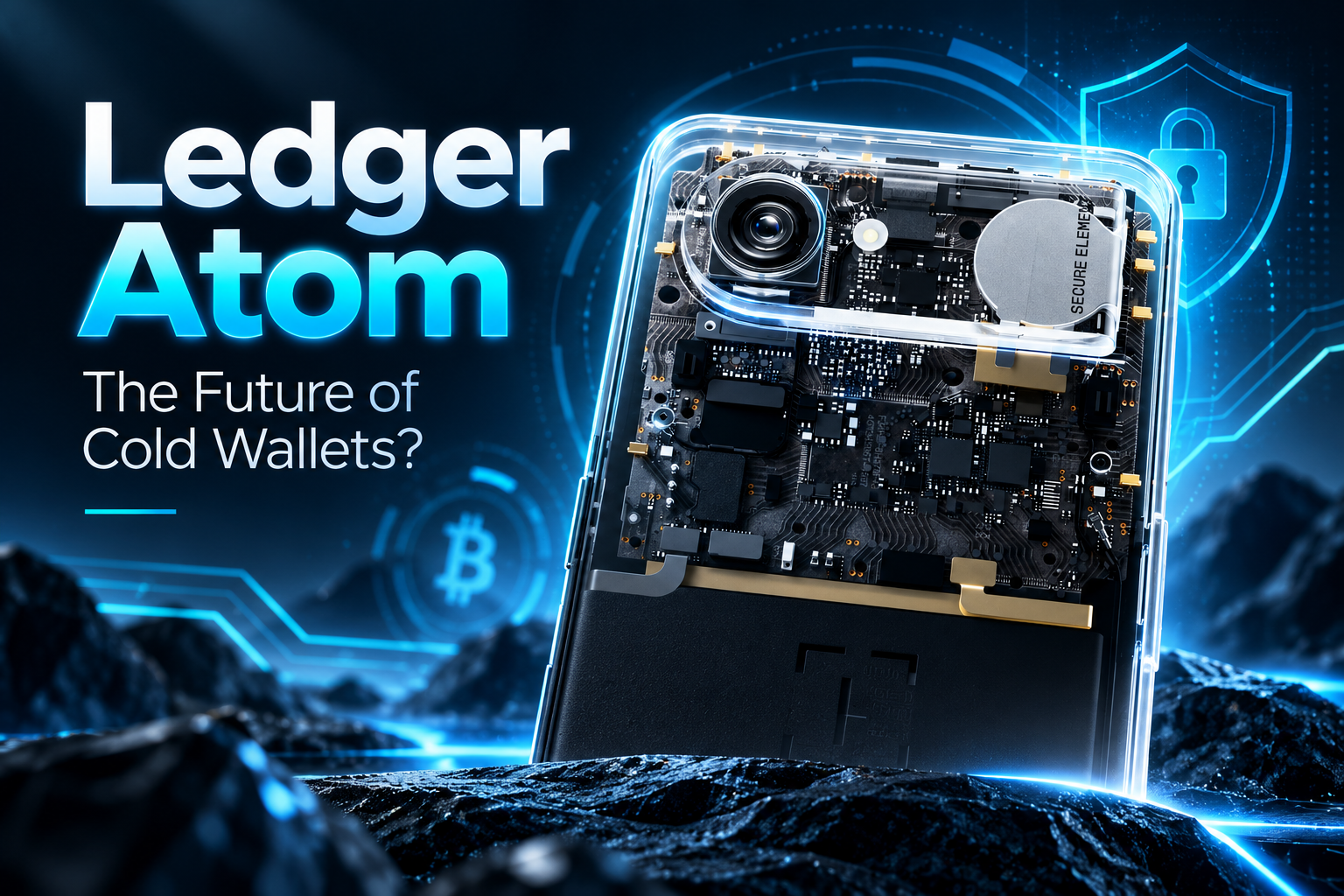
The new device looks much like a smartphone. It has a large AMOLED touchscreen, cameras, internet access, and the ability to run everyday applications. But Ledger isn't selling it as a phone. Instead, the company describes it as a security and privacy device that brings its hardware-wallet technology into a connected mobile platform.
The attraction is easy to understand. You could check your Bitcoin balance, manage your portfolio, use decentralized applications, and approve transactions without reaching for a second device.
The question is whether Ledger can make that experience as secure as using a dedicated hardware wallet.
Etymology & Physical Security: Why Ledger Named Its Mobile Signer 'Atom'
The word atom refers to the basic building block of matter. Ledger hasn't explicitly explained why it chose the name, but the company's recent statements offer an interesting clue.
In March 2026, Ledger CEO Pascal Gauthier published an essay called Revenge of the Atoms. He argued that, as artificial intelligence becomes more capable of exploiting software, protecting sensitive digital information will increasingly depend on physical hardware.
That idea fits the new product remarkably well.
Our interpretation is that Atom represents Ledger's belief that digital security should be anchored in something physical: dedicated security chips that operate separately from ordinary applications.
Rather than relying entirely on software to protect your money, Atom uses hardware to determine which parts of the device can access sensitive information.
This could explain the name, although Ledger hasn't officially confirmed that interpretation.
Display & Chassis Specs: 6.77" AMOLED, 1300 Nits & Weight Comparisons
At first glance, Atom doesn't resemble the small Ledger Nano devices that helped establish the company's reputation.
Its 6.77-inch AMOLED display occupies most of the front, giving users enough space to navigate financial applications and review transactions without struggling with a tiny screen.
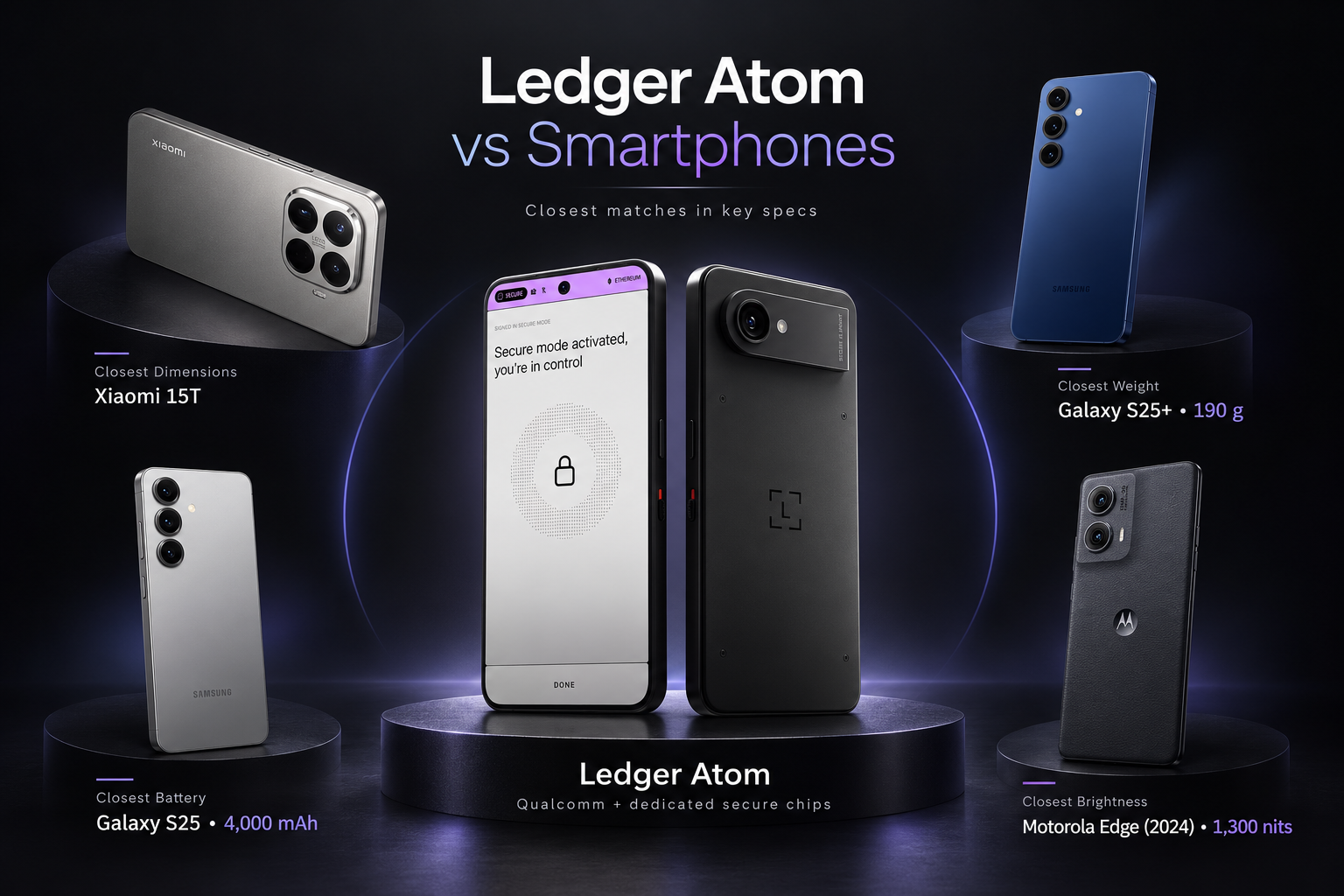
The display has a reported resolution of 1080 × 2392 pixels, a 60 Hz refresh rate, and Gorilla Glass 3 protection.
An early technical review also reports peak brightness of 1,300 nits, although Ledger's public product specifications have not independently confirmed that figure.
If accurate, that would put Atom below several modern smartphones in maximum brightness, but it could still provide a perfectly usable display for everyday financial tasks.
Ledger Atom Compared With Everyday Smartphones
| Device | Weight | Screen | Refresh Rate | Peak Brightness |
|---|---|---|---|---|
| Ledger Atom | 189 g* | 6.77" AMOLED | 60 Hz | 1,300 nits* |
| iPhone 15 Pro | 187 g | 6.1" OLED | 120 Hz | 2,000 nits |
| Google Pixel 8a | 189 g | 6.1" OLED | 120 Hz | 2,000 nits |
| Xiaomi 15 | 191 g | 6.36" AMOLED | 120 Hz | 3,200 nits |
Atom's 189 g weight comes from preliminary specifications; Ledger's currently accessible product page lists 250 g. Its 1,300-nit brightness figure comes from a third-party technical review and remains unconfirmed in the public product specifications. Brightness figures are manufacturer-reported and may use different testing conditions.
If the earlier 189-gram weight is confirmed for the production model, Atom would weigh exactly the same as the Pixel 8a and only two grams more than the iPhone 15 Pro, despite offering a considerably larger screen.
That's an appealing combination for a device intended to stay in your pocket throughout the day.
The screen itself is clearly not intended to compete with the fastest flagship smartphones. Its 60 Hz refresh rate is modest, but checking balances and approving transactions doesn't demand the same display performance as gaming.
What matters more is whether users can read transaction details comfortably, especially outdoors.
Hardware Specifications: 4,000 mAh Battery, eSIM & Privacy Camera Cut
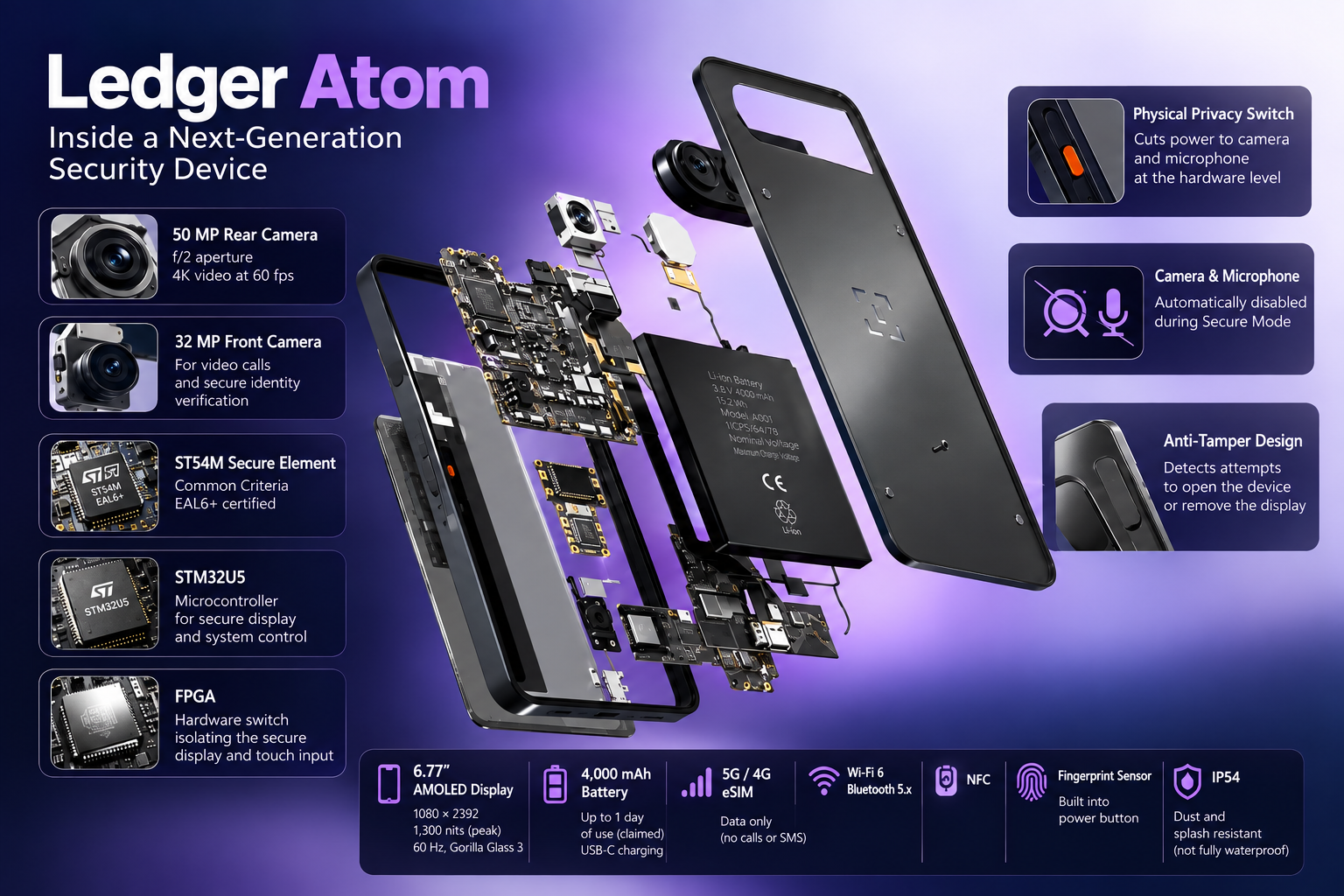
Ledger Atom includes a 4,000 mAh battery, which the company says is designed for more than a day of use.
That is roughly the capacity of some compact smartphones, although it falls below the batteries found in many newer Android models.
For comparison, the Google Pixel 8a carries a 4,492 mAh battery, while the Xiaomi 15 offers a considerably larger battery.
Atom's actual endurance is still unknown. Running applications, maintaining a mobile data connection, and switching between operating environments will all consume power. Real-world testing will be needed to see how long it lasts.
The device charges through USB-C. Ledger hasn't confirmed its charging wattage, so we don't yet know how quickly it can reach a full charge.
The cameras are surprisingly capable on paper for a device focused on protecting digital assets. Atom has a 50 MP rear camera, a 32 MP front camera, and support for 4K video recording at 60 fps.
Other features include Wi-Fi, Bluetooth, NFC, fingerprint authentication, and 4G/5G connectivity through an eSIM.
There is one catch: Atom cannot make traditional cellular calls or send SMS messages.
Its mobile connection is used for internet access. You can communicate through supported internet-based apps, but you cannot use it for regular cellular or emergency calls.
So although Atom looks like a smartphone, it isn't intended to replace one completely.
Dual Operating System Architecture: Standard Android vs. Ledger OS (EAL6+)
The part that makes Atom different isn't visible from the outside.
Inside the device are two separate operating environments.
The first is based on Android Open Source Project. It runs everyday applications, manages connectivity, and provides the familiar mobile experience.
The second is Ledger OS, which runs independently on a dedicated Secure Element and handles sensitive operations, including private-key management and transaction signing.
The Secure Element uses a chip certified to Common Criteria EAL6+, a high assurance level for the evaluated hardware.
Modern smartphones already have dedicated security components. Apple's Secure Enclave and Google's Titan security technology, for example, protect sensitive information from ordinary applications.
Ledger's approach differs in the way its security environment takes control of the display during financial approvals.
Secure Mode Transaction Signing: FPGA Control, Secure Bar & Clear Signing
Imagine opening Ledger Wallet and preparing to send Bitcoin.
You enter the recipient's address and the amount, just as you would on a regular mobile wallet.
When you reach the approval stage, Atom automatically switches into Secure Mode.
At that moment, Ledger OS takes control of the touchscreen through a dedicated hardware switching system. The normal Android environment can no longer control what appears on the secure display or what the user enters.
You can review the transaction directly through Ledger's isolated security environment before confirming it with your Ledger PIN.
A Secure Bar at the top of the display indicates whether the device is operating in Standard Mode or Secure Mode.
This matters because malware on an ordinary smartphone can potentially manipulate what users see, even when sensitive information is protected by a separate security chip.
Ledger's design is intended to make that kind of interference considerably harder during supported secure operations.
It doesn't make the device impossible to compromise, and an EAL6+ chip doesn't mean the entire product carries the same certification. Still, the separation between Android and Ledger OS is the strongest reason to take Atom seriously as a security device.
Ledger also says Atom is designed to support post-quantum cryptography. That doesn't make today's cryptocurrencies immune to future quantum attacks, but it may help the device support newer protection methods as they become available.
Hardware Anti-Tampering: Circuit-Level Privacy Switch & Active Sensors
Ledger has added a physical Privacy Switch on the side of Atom.
When activated, it disconnects the cameras and microphones at the circuit level. This means an application cannot simply override the switch through software.
The cameras, microphones, and certain sensors are also disabled automatically when Secure Mode takes over.
That feature goes beyond cryptocurrency protection. It could appeal to people who regularly handle confidential financial or business information.
Ledger has also described physical tamper-detection mechanisms intended to identify attempts to open or modify the device.
The aim is to make interference with internal components more difficult to conceal.
These protections are promising, particularly given concerns about supply-chain attacks against hardware wallets. But their effectiveness will need to be assessed on finished devices.
Ledger also plans to introduce encrypted messaging features based on technologies such as OpenPGP, extending the device's security functions beyond cryptocurrency transactions. Those messaging capabilities are not yet available.
Ledger Atom vs. Flex, Stax & Solana Seeker: Comparing Web3 Signers
Atom isn't simply a Ledger Flex with a bigger screen.
Ledger Flex and Stax are dedicated hardware signers. They protect private keys and let users review transactions on secure screens, but typically work alongside a separate phone or computer.
Atom combines those activities in one connected device.
Solana Seeker is another interesting comparison. It is an Android smartphone designed around Web3 applications, with a hardware-backed Seed Vault for sensitive cryptographic operations.
Atom comes at the problem from the opposite direction: it starts with Ledger's signing and security model, then adds the functionality of a connected mobile device.
Its hardware-controlled Secure Mode is a major part of that distinction.
That doesn't automatically make it safer than every competing product. Each has a different design, and a complete security assessment requires more than comparing chip certifications.
For someone who stores Bitcoin and rarely makes transactions, a Ledger Flex or another dedicated wallet may be perfectly adequate.
Atom makes more sense for users who regularly move between exchanges, decentralized finance applications, and different digital assets.
Ledger Atom and AI Agents: How Transaction Approval Stays Under Your Control
Ledger also sees Atom as a device for a world in which AI agents increasingly act on behalf of users.
An AI agent might monitor your portfolio, suggest a trade, or prepare a payment. But giving software unrestricted control over cryptocurrency would introduce obvious risks.
With Ledger Agent Intent, compatible agents can prepare requests while leaving the final approval to the person holding the Ledger device.
The agent proposes the action. You review the details and decide whether to approve it.
This isn't exclusive to Atom; other compatible Ledger devices support the same system.
The difference is convenience. Atom could let users handle the agent, the application, and the secure approval on one screen.
There are limits, of course. A device can protect your private keys without protecting you from every bad investment decision or malicious smart contract. The user still needs to understand what is being approved.
Is Ledger Atom a Cold Wallet or a Connected Hardware Signer?
Strictly speaking, Atom isn't an air-gapped wallet.
It connects to the internet and runs everyday applications, which makes it different from a device kept completely offline.
However, its private keys are designed to remain isolated within a Secure Element that Android cannot directly access.
This follows the security principle used by Ledger's traditional hardware wallets, even though the surrounding device is now far more connected.
It is therefore more precise to call Atom a connected hardware signer with isolated private-key storage than a fully offline cold wallet.
The distinction matters, particularly for people who prioritize maximum separation from internet-connected systems.
Ledger Atom Founders Edition: Price, Planned Shipping and Repair Support
Ledger announced Atom in October 2026, with the Founders Edition priced at $849 and shipping planned for summer 2027.
That is expensive compared with conventional hardware wallets.
But Atom isn't competing on storage security alone. Ledger is asking buyers to consider the value of having a hardware signer, mobile applications, privacy controls, and connected asset management in one device.
Whether that combination justifies the price will depend on how well it works in practice.
The company also promises spare-parts availability for seven years after the final device is sold, although repair costs and the long-term software support policy deserve closer examination.
Who Is Ledger Atom For? Everyday Crypto Use vs Long-Term Storage
Ledger Atom is an interesting attempt to solve a familiar problem: hardware wallets are secure because they separate private keys from everyday software, but that separation can make them less convenient.
Atom tries to preserve the first advantage while reducing the second inconvenience.
Its large touchscreen, mobile connectivity, and application support make it feel closer to a smartphone. Inside, Ledger has built a dedicated environment intended to keep transaction approvals and private keys away from the normal operating system.
That combination could be especially useful for people who manage cryptocurrency frequently rather than simply holding it for years.
There are still unanswered questions about battery life, screen brightness, charging, software compatibility, and the security of the final production hardware.
And while the technology is promising, a connected device will never be identical to a completely offline wallet.
Still, Atom raises a worthwhile question about the future of cryptocurrency storage: perhaps the next generation of hardware wallets won't be devices we take out only when we need to sign a transaction. Perhaps they'll become everyday security devices that we carry alongside our keys and phones.
Ledger Atom is one of the first serious attempts by an established hardware-wallet manufacturer to make that idea practical.
Frequently Asked Questions (FAQ)
Q1: Is Ledger Atom a smartphone or a hardware wallet?
It borrows features from both. Atom runs apps, connects to the internet and has cameras and a large touchscreen. It also uses a separate security environment to protect private keys and approve crypto transactions. Think of it as a connected hardware signer with smartphone-style features.
Q2: Can Ledger Atom replace my everyday phone?
Not completely. Its eSIM provides mobile internet access, but it does not support regular cellular calls or SMS. You can use compatible internet-based communication apps, though you would still need another phone for traditional calls, including emergency calls.
Q3: Does EAL6+ certification mean Ledger Atom cannot be hacked?
No. The certification applies to the evaluated security chip, not automatically to the entire device. It also cannot protect you from every scam or a transaction you knowingly approve. You still need to check what you are signing.
Q4: What does the Ledger Atom Privacy Switch do?
The physical switch disconnects the cameras and microphones at the circuit level. An app should therefore be unable to turn them back on through software while the switch is engaged. It does not disconnect the device from the internet or make your activity anonymous.
Q5: How is Ledger Atom different from Ledger Flex and Stax?
Flex and Stax are dedicated hardware signers that usually work alongside a phone or computer. Atom brings apps, connectivity and secure signing into one device. That could make frequent transactions more convenient, while a dedicated wallet may be enough for someone who mainly holds crypto.
Q6: Can an AI agent spend my crypto without asking me?
In the Ledger Agent Intent workflow described in the article, an agent can prepare a request, but you review and approve it on your Ledger device. That approval step matters: protecting your keys does not guarantee that an AI-generated action is sensible or that the contract involved is trustworthy.
Q7: How long does Ledger Atom’s battery last?
Ledger says its 4,000 mAh battery is designed to last more than a day. Independent testing is still needed to see how that holds up with mobile data, apps and regular transaction signing. Battery capacity alone does not tell us how long the device will run.
Q8: What should I check before buying Ledger Atom?
Check the final specifications, supported apps, shipping terms and independent reviews of production devices. The article highlights unresolved questions about weight, brightness, charging and battery life. If you already own a hardware wallet, consider whether having apps and signing on one device would make a useful difference to your routine.